In about three minutes, ChatGPT writes in your voice whenever it writes for you: emails, posts, replies, cover letters, the message you've been putting off. It works on every ChatGPT plan.
You keep asking ChatGPT the way you do now. You don't have to name Idiolect AI in your requests.
Connect
- Go to idiolect.app/connect and sign in.
- Under Chat apps, select ChatGPT.
- Select Open ChatGPT directory. The Idiolect AI plugin page opens in ChatGPT.
- On that page, select the button that adds Idiolect AI to ChatGPT.
- Sign in to Idiolect AI with the email you use on idiolect.app.
- If you see a screen that asks you to allow access, select Authorize.
Try it
- Go back to the Connect page.
- Under Try it, select Open ChatGPT. A new chat opens with this request already typed in:
Use Idiolect AI to rewrite this sentence in my usual style: [a sentence that you wrote]- Put a sentence you wrote in place of the brackets.
- Send it.
If ChatGPT answers through Idiolect AI, you're set up. No Writing Profile yet? Send it anyway. Idiolect AI asks how you want to start, as the next section shows.
Your first real request
Ask for something you need today. Three to start with:
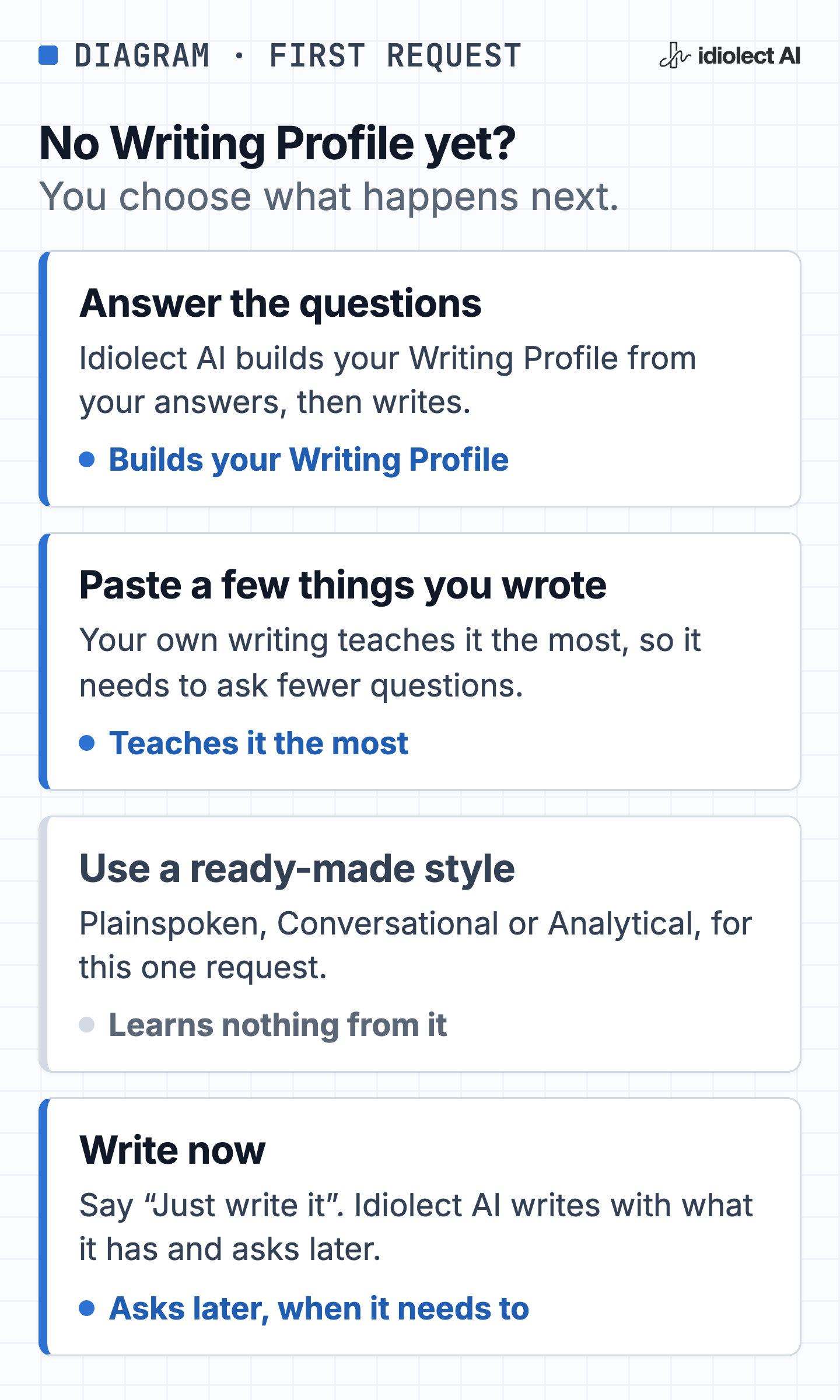
Write a short thank-you email to a colleague for reviewing my proposal.Make this message sound more like me: [paste your message]Show my Writing Profile and its rules.If you don't have a Writing Profile yet, the first answer can hold a few questions about how you write. You choose what happens next:
- Answer the questions. Idiolect AI builds your Writing Profile from your answers, then writes.
- Paste a few things you wrote. Your own writing teaches it the most, so it needs to ask fewer questions.
- Use a ready-made style for this one request: Plainspoken, Conversational or Analytical. It writes in that style, not yours, and learns nothing from it. Starting with no samples shows all three.
- Write now. Say "Just write it". Idiolect AI writes with what it has and asks later, when it needs to.
You decide what it keeps
Connecting Idiolect AI does not give ChatGPT permission to save your writing or your rules. You give that permission for the material yourself, in the chat. Once you've given it, it holds for the rest of that conversation.
To add something you wrote to your Writing Profile:
Add this to my Writing Profile. I wrote it myself: [paste]To save a lasting preference:
From now on, end my emails with "Thanks", not "Best".Idiolect AI only ever returns writing. It never sends or publishes anything for you.
If ChatGPT doesn't use it
It answers on its own, without Idiolect AI. Ask for the writing directly, and name Idiolect AI: "Use Idiolect AI to reply to this email."
Asked to sign in again, or it says you have no Writing Profile? Follow Reconnecting and other connection fixes.
It says you have no words left. See your words in Settings → Plan on idiolect.app. Plans and word packs are on the pricing page.
If you can't add apps at work
Some workplaces turn off plugins. You can still give ChatGPT a short description of how you write, called a Voice Card.
- Go to idiolect.app/connect and sign in.
- Select If you cannot add a connector, copy your Voice Card.
- Select Copy Voice Card.
- In ChatGPT, go to Settings → Personalization → Custom instructions.
- Paste the Voice Card into your custom instructions.
Codex too
The same plugin works in Codex. Open Codex and sign in with the same ChatGPT account. Idiolect AI in Claude Code, Codex and Cursor has the details and developer examples.
Why it works
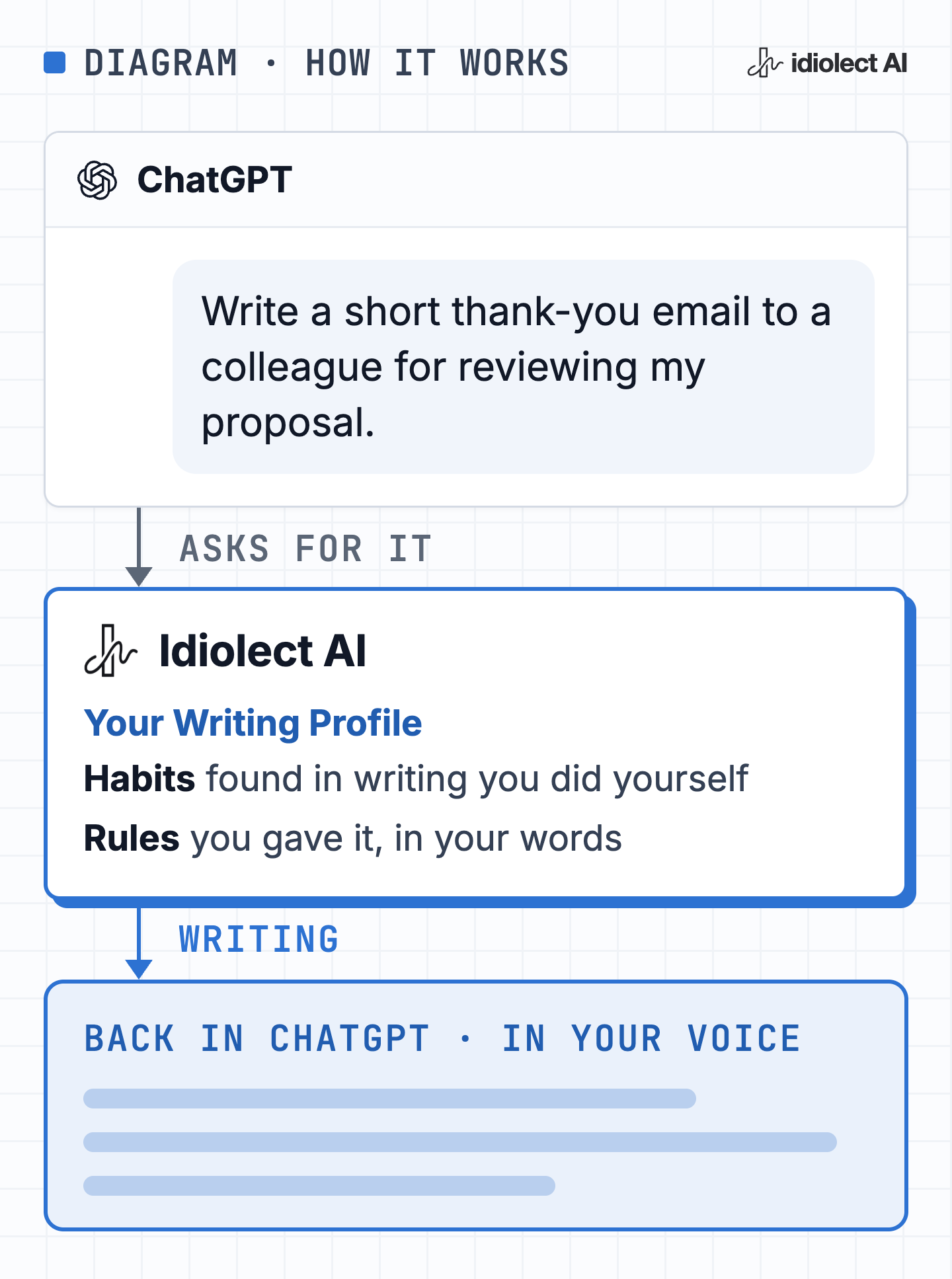
When ChatGPT writes for you, it asks Idiolect AI for the writing. Idiolect AI writes it with your Writing Profile: the habits it found in writing you did yourself, and the rules you gave it. Custom instructions are a few lines you write about yourself once. A Writing Profile is built from your writing and keeps updating as you write.
The idea underneath
Ask people to describe how they write and they'll name a handful of things they're proud of: "I'm direct", "I keep it short". Those descriptions are usually true and almost never enough, because the habits that make writing recognisably yours are mostly ones you don't notice. How you open a message. The small words you lean on. Whether you thank people before or after the ask.
That's why the evidence matters more than the self-portrait. In 2013, it was small, unremarkable words that helped show J.K. Rowling had written a crime novel under another name. We tell that story in How the smallest words gave away J.K. Rowling. Your own small words do the same quiet work in every email you send. A description of you can miss them. Your writing can't.