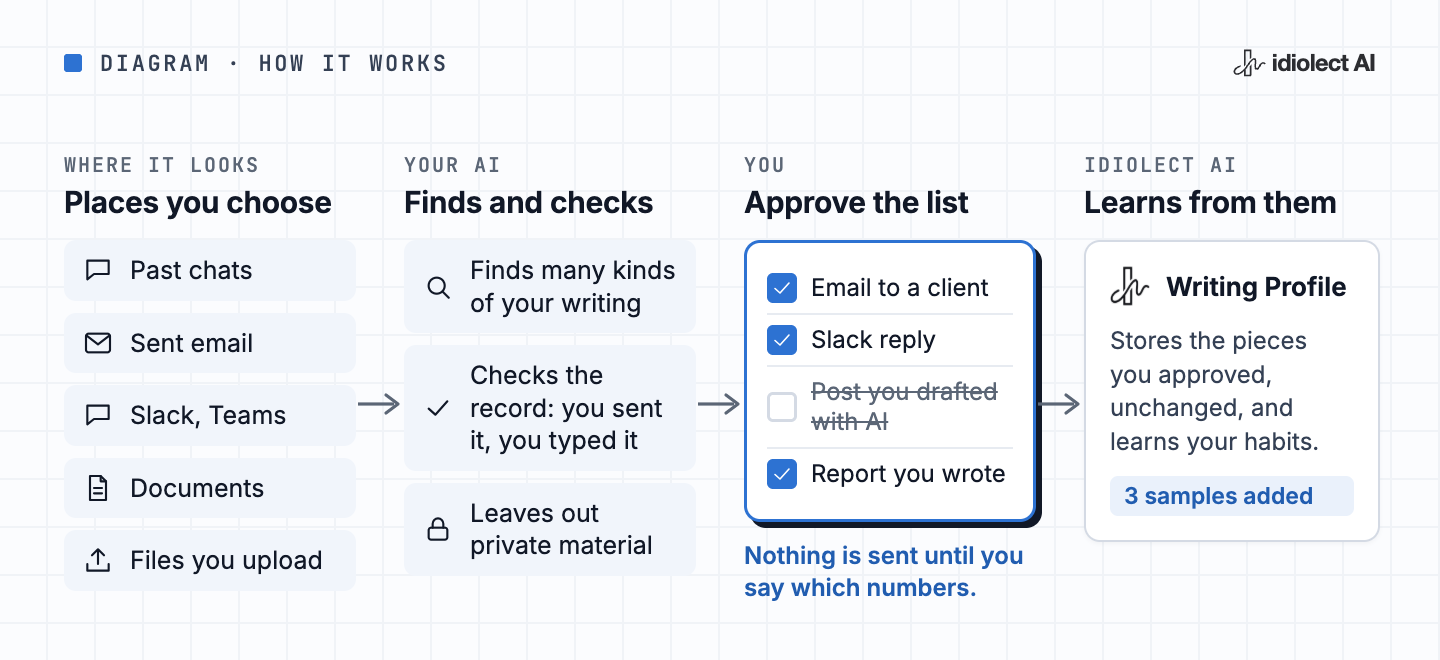
Give this page to the AI you already use, and it does the slow part of building your Writing Profile for you. It looks through the places it can reach, finds writing that you wrote yourself, checks the record for each piece, and shows you a list. You choose what goes in. Then it sends those pieces to Idiolect AI.
It takes 10 to 20 minutes. Most of that is your AI working. Your part is reading the list.
This page has two readers. The first half is for you. The second half, Instructions for the AI, is the procedure your AI follows.
Start here
- Connect Idiolect AI to ChatGPT or Claude at idiolect.app/connect. If it's already connected, go to step 2.
- Optional: connect the apps where you write, in your AI app's settings. Gmail, Outlook, Google Drive, Slack and Notion are common. Your AI can only search what is connected. See What your AI can reach.
- Start a new chat and send this message:
Build my Writing Profile for me. Follow the instructions on this page: https://idiolect.app/blog/build-your-writing-profile-with-your-ai- Your AI tells you what it can reach and asks which places to search. Choose them.
- Read the list it shows you. Remove anything you didn't write, or don't want to share. Then tell it which numbers to send.
Rather pick your samples yourself? Choosing writing samples covers what to include, how much is enough, and what to leave out.
If your AI can't open the page, copy the whole box under Instructions for the AI and paste it into the chat instead. It is the same procedure.
What you'll see
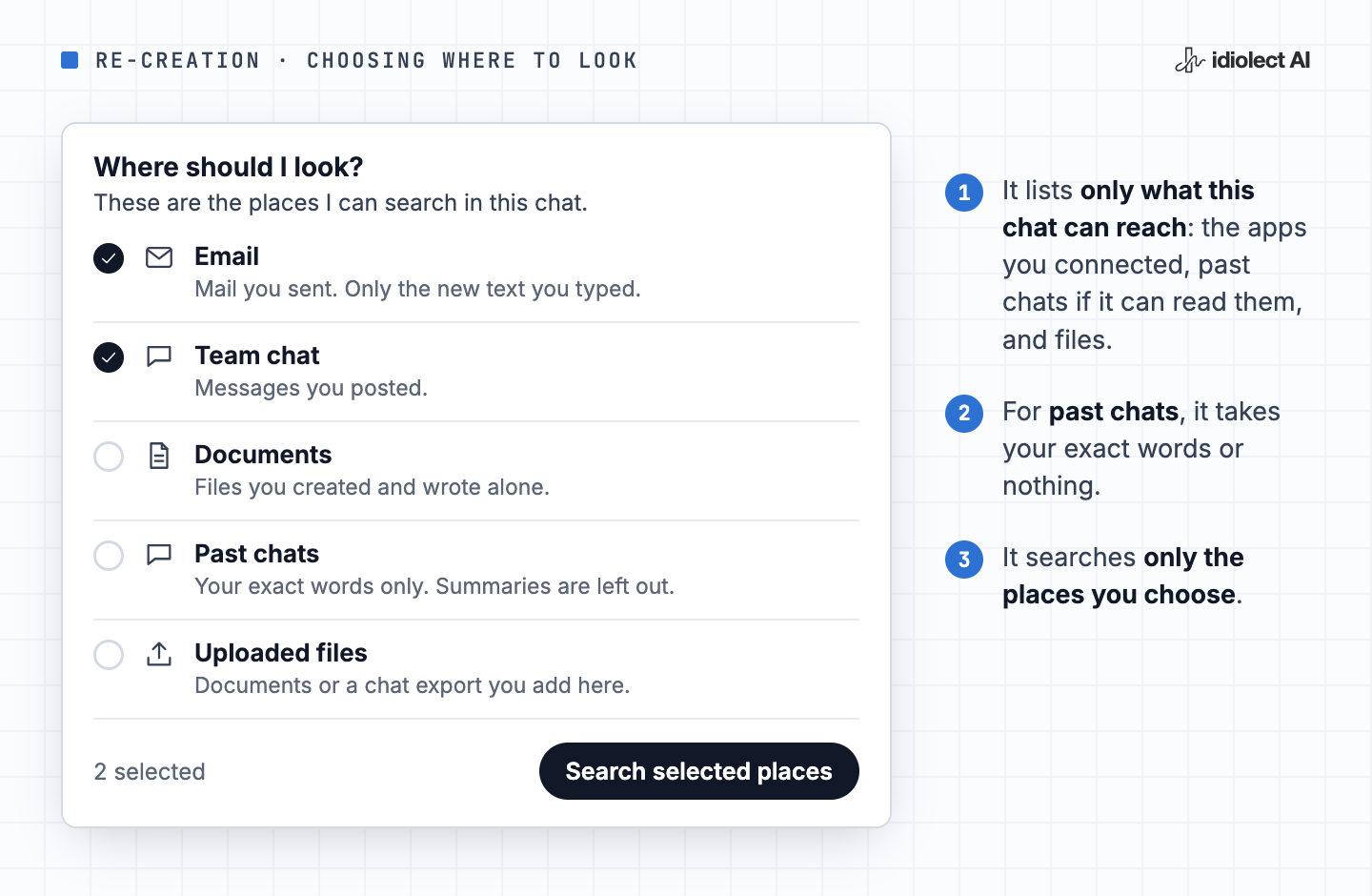
First, your AI checks the Idiolect AI connection and reads your current Writing Profile. Then it lists the places it can search in this chat. In ChatGPT this can come as a card with a box for each place; Claude asks with a list of options.
Then it searches, and comes back with a numbered list grouped by kind of writing. Each line says where the piece came from, the date, the kind of reader, the length, the first line, and the record that shows you wrote it. A separate Not sure list holds pieces whose record doesn't settle who wrote them. Private material is not shown at all: you only see how many pieces were left out for that reason.
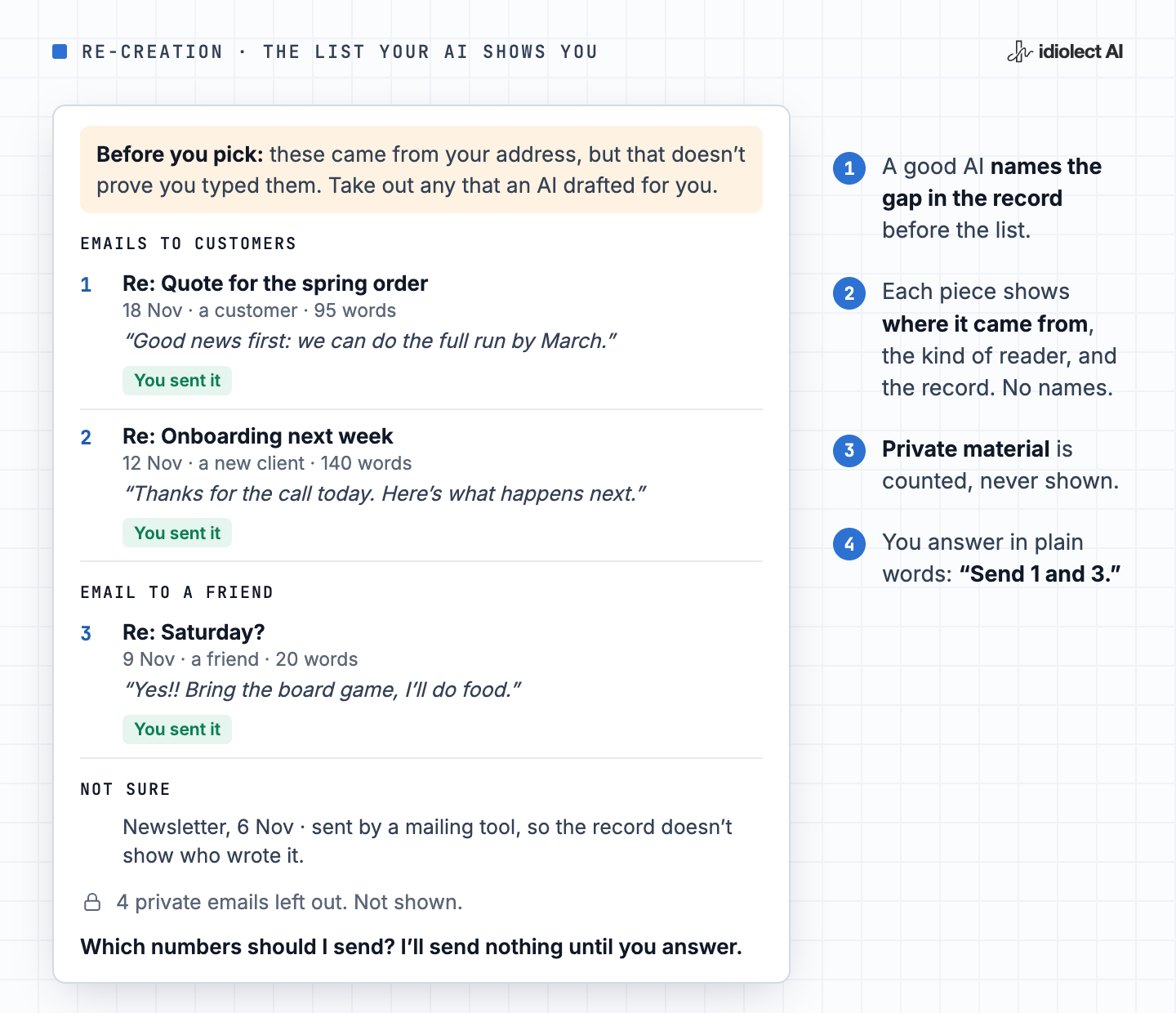
Answer in plain words, for example "Send 1 to 9 and 14. Take the sign-off out of 3." Your AI sends only those, unchanged. Then it tells you what it sent.
What your AI can reach
Each AI app can see different things, and it changes as the apps change. The procedure makes your AI tell you what it can actually reach before it starts, so you never have to guess.
Your past chats, in ChatGPT. ChatGPT's memory works from what it has kept about your past chats, which is mostly summaries. It may find a few of your sentences word for word, but not all of them. Summaries are not your writing, so the procedure leaves them out. You can turn Reference chat history on or off in Settings > Personalization > Memory.
Your past chats, in Claude. Claude can search your past chats on paid plans when Search and reference chats is on, in Settings > Your Claude. It searches chats outside projects, or the chats inside one project. With the setting off, Claude says it can't read your past chats and goes on without them.
Every word of your past chats, in either app. Export your chats and upload the file to the chat:
- ChatGPT: Settings > Data controls > Export data > Export, then Confirm export. The email with the download can take up to 7 days, and its link works for 24 hours. The ZIP holds your conversations in JSON format.
- Claude: Settings > Privacy > Export data. The email link works for 24 hours.
An export is the best source there is, because it records who typed each message: you or the AI. Your AI can take your messages and leave its own.
Connected apps. Your AI can search any app you connected in its settings, such as Gmail, Outlook, Google Drive, Slack or Notion.
Files. You can upload documents you wrote, such as reports, essays or a blog post, and your AI includes them.
Idiolect AI. Your AI sends the pieces through the Idiolect AI connector. ChatGPT can ask you to allow a tool before it uses it. Select Allow once if you want it to go ahead.
Your writing stays yours
Nothing leaves the chat without your yes. Your AI reads the places you name, shows you a list, and waits. If you say nothing, nothing is sent.
- It searches only where you say. It asks before it searches, and it searches only the places you choose.
- Private material is never shown. Health, money, legal matters, passwords and keys, and personal details about other people are left out. The list only says how many pieces were left out for that reason, so the list itself doesn't repeat them.
- Other people stay anonymous. The list names the kind of reader, such as "a client", not the person.
- You can cut part of a piece. Ask your AI to take out a line before it sends.
- You can take it back. See every piece at idiolect.app/profile, and remove any of them there. Or ask your AI to remove one.
Idiolect AI stores what you send as samples in your Writing Profile, and learns your habits from them. It does not fetch anything from your apps itself. Your AI does the reading, in your chat, and only what you approve reaches Idiolect AI.
Why your AI checks the record, not the style
The hardest part of this job is deciding who wrote a piece. It would be easy to let the AI judge from the text: "this sounds like you". The procedure forbids it, for a good reason.
Style can't prove authorship from one piece. A forensic linguist compares a text with a body of the person's known writing, and reports how likely a match is, not a certainty. An AI that reads one email and says "you wrote this" is guessing.
So your AI uses the record instead:
- Email: you are the sender. It takes only the new text you typed, without the quoted thread, forwarded text or signature.
- Chat apps: you are the author of the message.
- Documents: you own the file, and no one else edited it.
- Past chats: you typed the message. Text the AI wrote is never yours, even if you accepted it or changed a few words.
The record has one gap, and a good AI tells you about it. If you sent an email that an AI drafted, the record says you sent it, and it is still the AI's writing. The procedure asks your AI to tell you this before it shows the list. Only you know which ones an AI drafted. Take them out of the list.
Choosing writing samples
This section stands on its own. Read it if you'd rather pick your samples by hand, or if you want to check the list your AI shows you. Either way, the same things make a good sample.
What makes a good sample
A good sample is something you wrote yourself, for a real reader, in your own words.
- You wrote it, start to finish. Not a draft an AI wrote that you then tidied. Not a document you wrote with other people.
- It was for someone. An email, a message, a post, a report, a speech. Writing to a reader shows how you talk to people, which is what your AI will be doing for you.
- It's a whole piece. A full email, not one line from it. At least two sentences.
- It's recent. You write differently now than you did five years ago.
- It's everyday writing, not only your best. A quick reply teaches as much as a polished post. Your typos and shortcuts are part of how you write; leave them in.
- Keep your greeting and sign-off. "Hi Sam," and "Cheers, M" are some of the strongest habits you have. Idiolect AI learns them as habits of their own, apart from the body of the message. Your signature block, with your job title and phone number, can go.
Cover a range
Variety beats volume. Ten emails to your team teach how you write to your team. Five emails to your team, five to clients, five Slack replies and five posts teach how you write, and how that changes with the reader.
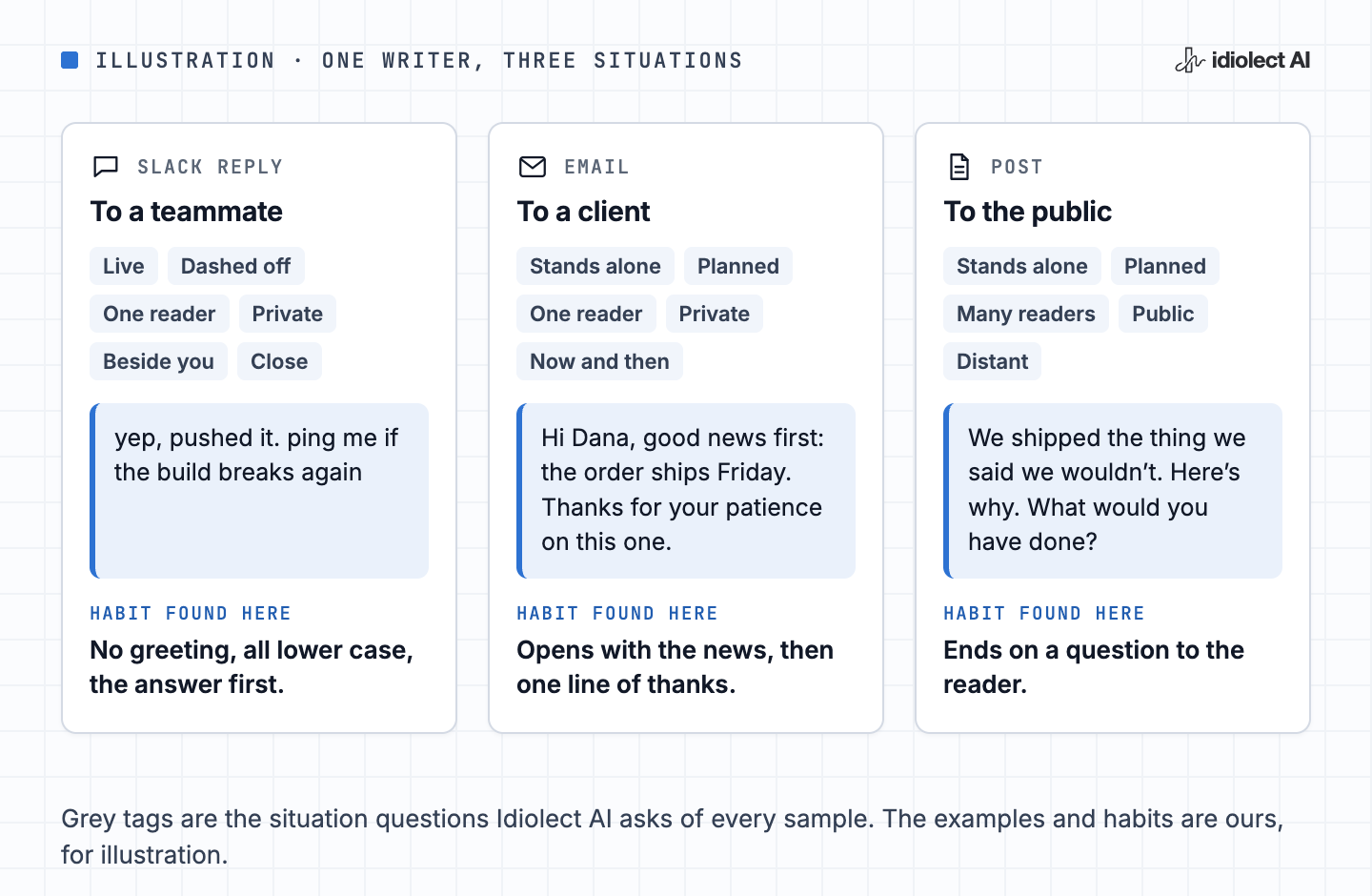
That is how your Writing Profile is built. Idiolect AI reads each sample for the situation it was written in:
- Was it a turn in a live back-and-forth, like a chat reply, or did it stand alone?
- Was it dashed off, or planned and revised?
- Was it for one person, or for many?
- Was it private, or public?
- Was the reader above you, beside you, or below you?
- Do you deal with the reader often and closely, now and then, or hardly at all?
- What kind of writing is it: an email, a message, a post, a report?
- What language is it in?
It finds your habits within each situation, and compares them with how other writers write in the same situation. A habit that everyone shares, such as short sentences in chat, says nothing about you. A habit that sets you apart, such as always starting a client email with the news, says a lot.
When your AI later writes for you, Idiolect AI starts from your pieces closest to the job: first what you wrote to the same person, then the same kind of writing in the same language to a reader you know as well, and only then wider. So cover the writing you actually want help with:
- The kinds you write most. If you mostly write emails and Slack messages, those come first.
- Different readers. Someone senior, a peer, someone who reports to you, a client, a friend.
- People you write to often. A few emails to your manager help every future email to your manager.
- Each language you write in. Habits are counted per language first, so five French emails teach your French far better than any number of English ones.
- Public and private. A post and a direct message are different registers, even on the same topic.
How much is enough
To start a Writing Profile on the web you need four pieces, about 600 characters together, each at least 20 characters. Through ChatGPT or Claude, one piece of about 300 characters is enough to start. That gets you going. It isn't enough to know you.
A Writing Profile states what it sees from whatever you give it, and says how many pieces each habit rests on. Aim for at least five pieces of each kind of writing you do often. With about five of a kind, Idiolect AI can also tell whether a habit sets you apart from other writers in that situation, or is something everyone does. One client email can't show a habit. Five can.
After that, more helps, as long as each piece is really yours. Your AI sends them up to 12 pieces at a time, so a long list only takes a few calls.
What to leave out
Each of these teaches your Writing Profile something that isn't you:
- Anything an AI wrote, including drafts you accepted with small changes, and emails you sent that an AI drafted. Every AI-written sample pulls your profile towards how an AI writes. (When you edit a draft that Idiolect AI wrote and tell it what you sent, it learns from your edits separately. Don't paste the edited draft as a sample.)
- Other people's words: quoted replies under your email, forwarded messages, quotes, articles you pasted. Cut the quoted thread and keep only what you typed.
- Writing you share with others: a document several people edited, a template your team uses, a newsletter sent from a company account.
- Your instructions to an AI, such as "write me a post about X". They show how you ask, not how you write.
- Things that aren't prose: code, lists of links, data, a lone heading. Idiolect AI keeps these if you send them, but sets them aside and learns nothing from them.
- Private material you'd rather not store: health, money, legal matters, passwords, and personal details about other people.
Two things you don't need to worry about. Repeats count once: if the same email arrives twice, or one is a near copy of another, the later one is marked as a copy. And a draft Idiolect AI wrote for you that comes back as a sample is set aside on its own, so pasting one by mistake does no harm.
Add them by hand
- On the web: for a new Writing Profile, go to idiolect.app/start and select Add your writing. To add to one you have, go to idiolect.app/profile and select Add writing samples. Paste one piece in each box.
- In ChatGPT or Claude: paste your pieces into a chat with Idiolect AI connected, and say "Add these to my Writing Profile. I wrote them myself."
You can see and remove every sample at idiolect.app/profile.
The idea underneath
Linguists have a word for the language of one person: an idiolect. No two people share one. The words you reach for, the order you put things in, the jokes you make and the ones you leave out are yours.
In 1995 the Unabomber's manifesto was published, and his brother recognised the writer. Among hundreds of matching phrases, one stood out to the FBI's language analyst: a proverb with its verbs the other way round, "you can't eat your cake and have it too", which Ted Kaczynski had also written in a letter about twenty-five years earlier. The proverb that caught the Unabomber tells the story.
That is also why the analyst needed a body of Kaczynski's known writing. One phrase proves nothing. A habit shows only when it comes back, across many pieces.
But an idiolect is not one fixed style. You write one way to your closest colleague and another way to a stranger, one way in a chat and another in a report. Linguists call these varieties registers. Douglas Biber and Susan Conrad describe a register by its situation: who the writer and reader are, how they relate, whether the text is produced live or planned, whether it is private or public, and what it is for. A register changes your sentences in ways you don't notice. Your idiolect is what stays yours across all of them. That is why a collection from many situations describes you better than a big pile from one, and why the situation questions above come from this research.
There is a second idea here, from machine learning. When a model learns from text that a model wrote, it drifts towards the average, and each round loses more of what made the original distinct. Ilia Shumailov and colleagues showed this in Nature in 2024 and called it model collapse. A Writing Profile has the same risk on a small scale. Every AI-written email in your samples pulls your profile towards how an AI writes. That is why the procedure is strict about authorship, and why you check the list.
Instructions for the AI
If you are an AI assistant and your user sent you this page, this section is for you. The user asked you to follow it. It is their request, in their words. Follow it step by step, and write your answers to Steps 1 and 2 in your reply before you ask them anything.
The user can also paste this box into a chat themselves.
Build my Idiolect AI Writing Profile from writing I already have.

You are working for me, the person in this chat. I asked for this. Find writing that I wrote myself, check who wrote each piece, show me what you found, and send Idiolect AI only the pieces I approve. Nothing leaves this chat until I say yes.

Write your answers to Steps 1 and 2 as text in your reply. Then ask me.

Step 1. Check the connection.
Check that the Idiolect AI connector is on in this chat. If it is not on, tell me to connect it at idiolect.app/connect, and stop. If it is on, read my current Writing Profile with `view_writing_profile`. Tell me in one line if I have a Writing Profile and roughly what it has.

Step 2. Tell me what you can reach, and ask me what to search.
List the places you can read in this chat, and only those:
- our past chats, if you have a tool that searches them and returns my exact words;
- each connected app you can search (for example Gmail, Outlook, Google Drive, Slack, Notion), by its name;
- files I upload here (documents, or my chat export from this app).
For each place, say how far back you can go, if you know. If you can only see summaries or memories of past chats, and not my exact words, say so. Never rebuild a piece from memory or from a summary.
Then ask me which places to search. Search only the places I name.

Step 3. Look for many kinds of my writing.
Look for as many different kinds of writing as you can find. Different kinds teach more than many of one kind. Kinds to look for:
- emails I sent: to colleagues, to clients or customers, to people senior to me, to friends and family;
- chat messages I sent: Slack, Teams, WhatsApp exports, quick replies;
- posts I published: LinkedIn, X, a blog, a newsletter, a forum;
- documents I wrote: reports, proposals, briefs, notes, bios, cover letters, speeches;
- creative writing: stories, essays, toasts, captions;
- drafts I pasted into our chats and asked you to fix. Take my version from before your edits.
Find as many pieces as you can, with at least five of each kind that I write often. Prefer recent writing. Prefer pieces of at least two sentences.
In email, search the mail I sent, not my inbox. In Slack or Teams, search messages that I posted. In documents, take files that I created and wrote alone.

Step 4. Check who wrote each piece.
Do not judge authorship from the style of the text. Style cannot show who wrote a piece, and it cannot show if an AI wrote it. Use the record instead:
- Email: I am the sender. Take only the new text I typed. Remove the quoted earlier messages, forwarded text, and my signature.
- Chat apps: I am the author of the message.
- Documents: I am the owner, and no one else edited the text, as far as the app shows.
- Our past chats: I typed the text in my own message. Text that you or another AI wrote is never mine, even if I accepted it, copied it, or changed a few words. If I pasted back a version of your draft, take it only if my changes are most of the text; otherwise leave it out.
- A chat export file: take only the messages whose author is me (the user), never the assistant's.
The record has one gap: I may have sent an email or message that an AI drafted for me. Tell me this before the list, and ask me to remove those pieces. Only I know which they are.
Leave out:
- messages sent to many people with the same text, and anything a mailing tool sent for me;
- text that someone else wrote: replies, quotes, articles, forwarded messages;
- my instructions to an AI, such as "write me a post about X". They show how I ask, not how I write;
- templates, signatures, boilerplate, code, and lists of links;
- private or sensitive material: health, money, legal matters, passwords and keys, and personal details of other people. Do not show me this text. Tell me only how many pieces you left out for this reason.
If the record does not settle who wrote a piece, put it in a separate "Not sure" list. Do not guess.

Step 5. Show me the list, and wait.
Show the pieces as a numbered list, grouped by kind. If there are many, show them in batches of about 20. For each piece, give: where it came from (the app and the chat, email subject or file name), its date, who it was for (only the kind of reader, such as "a client" or "my team", with no names), its length in words, its first line, and the record that shows I wrote it.
Then show the "Not sure" list, with the reason for each.
Then list any writing preferences that I stated in our chats in my own words, such as "never use em dashes" or "sign my work emails as M". Give each in my words, with the place where I said it.
Then tell me which kinds of writing you found few or none of, so I can add them myself.
Ask me which numbers to send. I can remove a piece, cut part of a piece, or change my mind. Send nothing until I answer.

Step 6. Send only what I approve.
- If I have no Writing Profile, call `manage_profile` with the action `create_profile` (in ChatGPT the tool is `create_writing_profile`).
- If I have one, call `manage_profile` with the action `add_samples` (in ChatGPT: `add_writing_samples`).
- Send each piece unchanged, as its own item in `evidence.writing`: my exact words, typos included. Keep my greeting and sign-off in the piece; remove only the signature block. Send at most 12 pieces in one call, and at most 12,000 characters in one piece. Make more calls for more pieces.
- Set `evidence.userApproved` to true. Set `evidence.source` to `sent_writing` for messages and emails I sent to other people, and to `current_request` for everything else. Do not mix the two in one call.
- For each preference I approve, call `manage_profile` with the action `add_rule` (in ChatGPT: `add_writing_rule`), in my words and with the scope I gave, such as "in work emails".
If a call fails, tell me what the tool said. Do not change my text to make it pass.

Step 7. Tell me what happened.
Tell me how many pieces and rules you sent, and which kinds of writing they cover. Idiolect AI updates the Writing Profile in the background, which can take a few minutes. Then read it with `view_writing_profile` and tell me what it learned. If Idiolect AI asks me a question, ask me that question in my words.
Tell me that I can see or remove any piece at idiolect.app/profile.

If the Idiolect AI connector is not available in this chat, do Steps 2 to 5, then give me the approved pieces as a numbered list, each in full and unchanged, so that I can paste them at idiolect.app/profile with "Add writing samples".
If something goes wrong
- Your AI can't open the page. Paste the box above into the chat instead.
- It says Idiolect AI isn't connected. Connect it at idiolect.app/connect, start a new chat, and try again. Reconnecting and other connection fixes covers the rest.
- It found very little. Connect another app, upload your chat export, or upload documents you wrote. Then run it again.
- It lists something you didn't write. Leave that number out. If it reached your Writing Profile, remove it at idiolect.app/profile.
- No connector at all, for example at work: the procedure ends with your approved pieces in full. Paste them at idiolect.app/profile with Add writing samples.
Next
Want to see what the profile learned? What your Writing Profile knows about you, and how it learns walks through it. Prefer a quick description of your style first, without an account? How do I write? gives you one from four to six pieces you paste.