In about ten minutes, you'll have a Writing Profile built from writing you already have, and your first draft from Studio in your own voice. You don't need ChatGPT, Claude or any other AI app. Everything happens at idiolect.app.
This is also the way in if your workplace doesn't allow AI apps to add connectors.
Before you start
Find four things you wrote yourself: emails, messages, posts or notes. Together they need about 600 characters, which is roughly one long paragraph. Each one needs at least 20 characters. They can be in any language.
Leave out anything an AI drafted, anything someone else wrote, and signatures or quoted replies.
No writing to hand? You can answer four short questions instead. See step 4.
Build your Writing Profile
- Go to idiolect.app/start and sign in.
- On Get started, select Add your writing.
Paste one piece in each box. To get another box, select Add another sample. The Progress panel shows how many Samples that count you have, and your Characters so far.
A re-creation of Create your Writing Profile. - No samples? Select Answer 4 questions instead. Write each answer the way you'd send it.
- Select Build my Writing Profile. This can take one or two minutes.
- On Your Writing Profile is ready, select Make default if it shows and you'll also use Idiolect AI in other apps later.
The four questions are short, real situations:
- Ask someone to move a deadline or due date. Include your greeting and how you end the message.
- Friday's plans changed. Tell a teammate, classmate, group member or friend in chat.
- Write a short note about something you care about in your work, study, community or daily life.
- Give direct feedback on something that could be better. Pick how you'd send it.
Write something new
- Open Studio.
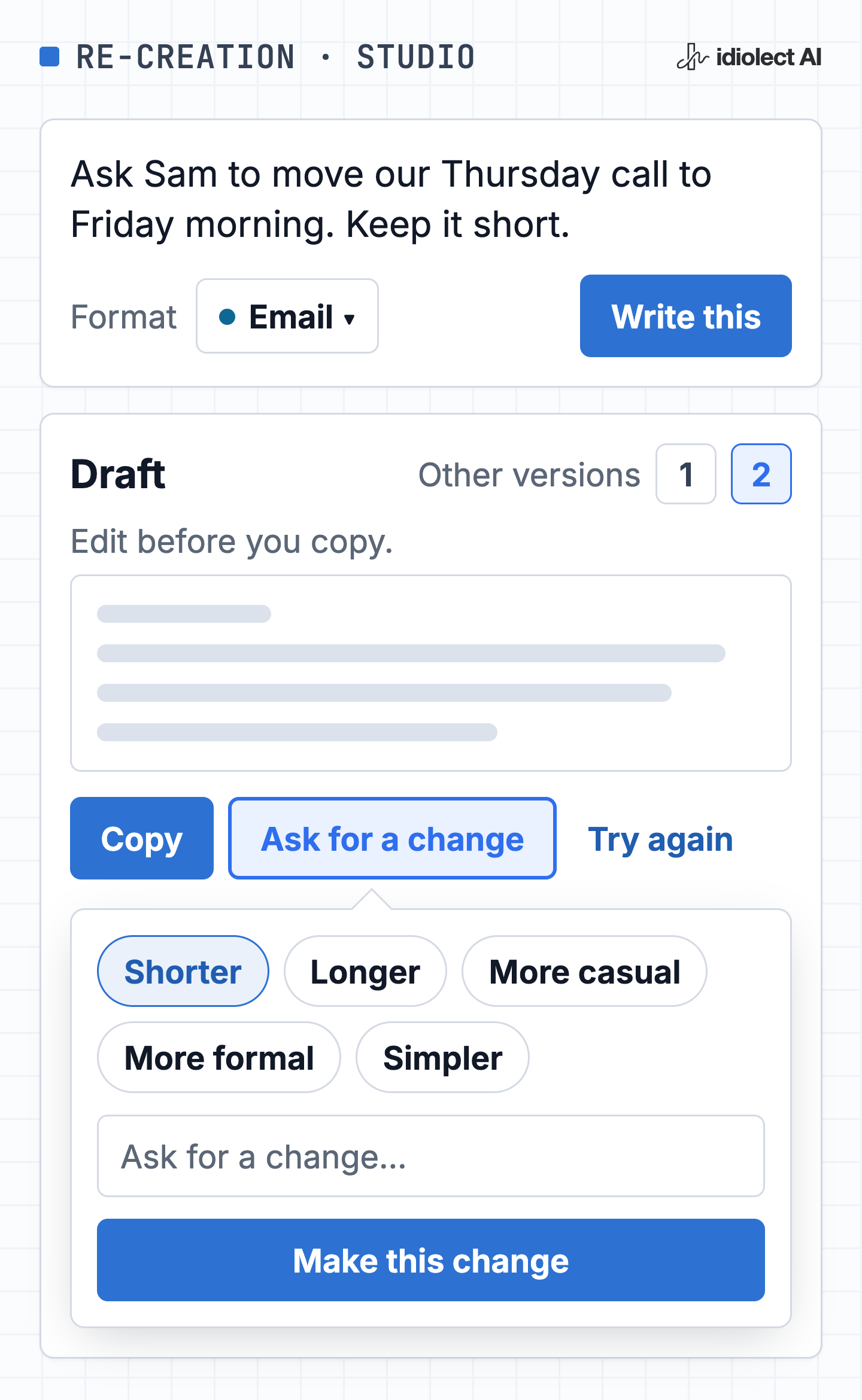
- In the box, type what you need. For example:
Ask Sam to move our Thursday call to Friday morning. Keep it short.- Open Format and choose one: LinkedIn, X post, X thread, Blog or newsletter, Email, Chat or General.
- Select Write this.
If Studio needs a fact it doesn't have, it asks you first. Give only the facts the text needs, then select Continue. Or select Skip.
Rewrite something you wrote
- Paste your text into the Studio box.
- Choose the Format.
- Select Rewrite this.
- To see what moved, select Show changes.
If a rewrite doesn't come out closer to how you write, Studio says so and keeps your original: "We kept your original text. The rewrite was not closer to how you write."
Change the result
- Select Ask for a change. Then select Shorter, Longer, More casual, More formal or Simpler.
- Or type your own change in Ask for a change…, then select Make this change.
- Want a fresh attempt? Select Try again. Earlier attempts stay under Other versions.
- Edit the draft yourself. It's editable in place: "Edit before you copy."
- Need the same text for somewhere else? Under Other formats, choose Email, Slack, Social or Essay.
- Select Copy when it's right. If you edited the draft, Idiolect AI records the version you copied.
If a result is no good, select Mark as wrong.
Choose a profile
If you have more than one Writing Profile, choose one in Choose a profile at the top of Studio. The one marked Default is the one your connected AI apps use.
Find it later
Open Library. It holds everything you wrote with Idiolect AI, from Studio and from connected AI apps. Search it, or filter by Source and Format. Open an item and select Start a new rewrite from this text to keep working on it.
Why it works
Studio and your connected AI apps share one Writing Profile and one set of rules. A rule you gave ChatGPT or Claude last week applies in Studio today, and the edited version you copy out of Studio is recorded against the same Writing Profile your AI apps write with. Rewrite keeps the facts you gave it and changes how they're said, so your own rough draft is often the best brief you can give.
The idea underneath
In Bird by Bird (1994), Anne Lamott argues that all good writers write bad first drafts, and that the bad first draft is how they get to a good second one. Her advice was meant for people writing books, but it holds for a two-line email too.
A rough draft you wrote yourself already carries your voice: your order of thoughts, the word you reached for first, the thing you said before you said the hard part. That's exactly what a blank request to an AI throws away. So when you can, write the clumsy version first and select Rewrite this, rather than describing what you want and selecting Write this. You'll be editing yourself, not someone else.
Next: What your Writing Profile knows about you, and how it learns